| Assignment | Points | Percent |
|---|---|---|
| Participation | 100 | 16.7% |
| Problem sets (8 × 25) | 200 | 33.3% |
| Quizzes (3 × 50) | 150 | 25.0% |
| Final project | 150 | 25.0% |
| Total | 600 | 100.0% |
Syllabus
Instructor
Course details
- Sundays and Tuesdays
- August 23–December 14, 2026
- 14:30–15:45; 16:00–17:15
- Room 1A12
Contacting me
Course objectives
The collection and analysis of quantitative data is a core tool of social science. Without a basic understanding of the techniques of data analysis and presentation, you will be cut off from all but the most basic forms of social investigation and inquiry. This course aims to acquaint you with these tools and introduce you to their application.
By the end of this course, you will (1) be data literate and (2) be able to answer your own questions with statistical and data scientific tools. Specifically, you’ll be able to:
- Be curious and confident with data
- Feel comfortable with R
- Tidy and wrangle data imperturbably
- Find patterns in data with appropriate graphs and visualizations
- Pose and test insightful hypotheses
- Accurately interpret results from basic inferential statistical analyses
- Understand the assumptions and limitations of statistical procedures
- Communicate the results of your analyses in accessible language
(And you’ll have a lot of fun throughout!)
Course philosophy
Classical statistics classes spend substantial time covering probability theory, null hypothesis testing, and other statistical tests first developed hundreds of years ago. Some classes don’t use software or actual real data and instead live in the world of mathematical proofs. They can be math-heavy and full of often unintuitive concepts and equations.
In this class, we will take the opposite approach. We begin with data and learn how to tidy, wrangle, manipulate, and visualize it with code. Later in the semester we turn to more classical topics like inference and statistical modeling, but continue to keep the focus on data as we do so.
In other words, there’s way less of this:
\[ f(x) = \dfrac{1}{\sqrt{2\pi}} e^{-\frac12 x^2} \]
And way more of this:
gdp_by_region <- gdp_data |>
  group_by(region) |>
  summarize(
    avg_gdp = mean(gdp),
    sd_gdp = sd(gdp)
  )
Over the last decade there has been a revolution in statistical and scientific computing. Open source languages like R and Python have overtaken older (and expensive!) corporate software packages like SAS and SPSS, and there are now thousands of books and blog posts and other online resources with excellent tutorials about how to analyze pretty much any kind of data.
This class will expose you to R—one of the most popular, sought-after, and in-demand statistical programming languages. Armed with the foundation of R skills you’ll learn in this class, you’ll know enough to be able to find how to analyze any sort of data-based research question in the future.
Important pep talk!
I promise you can succeed in this class.
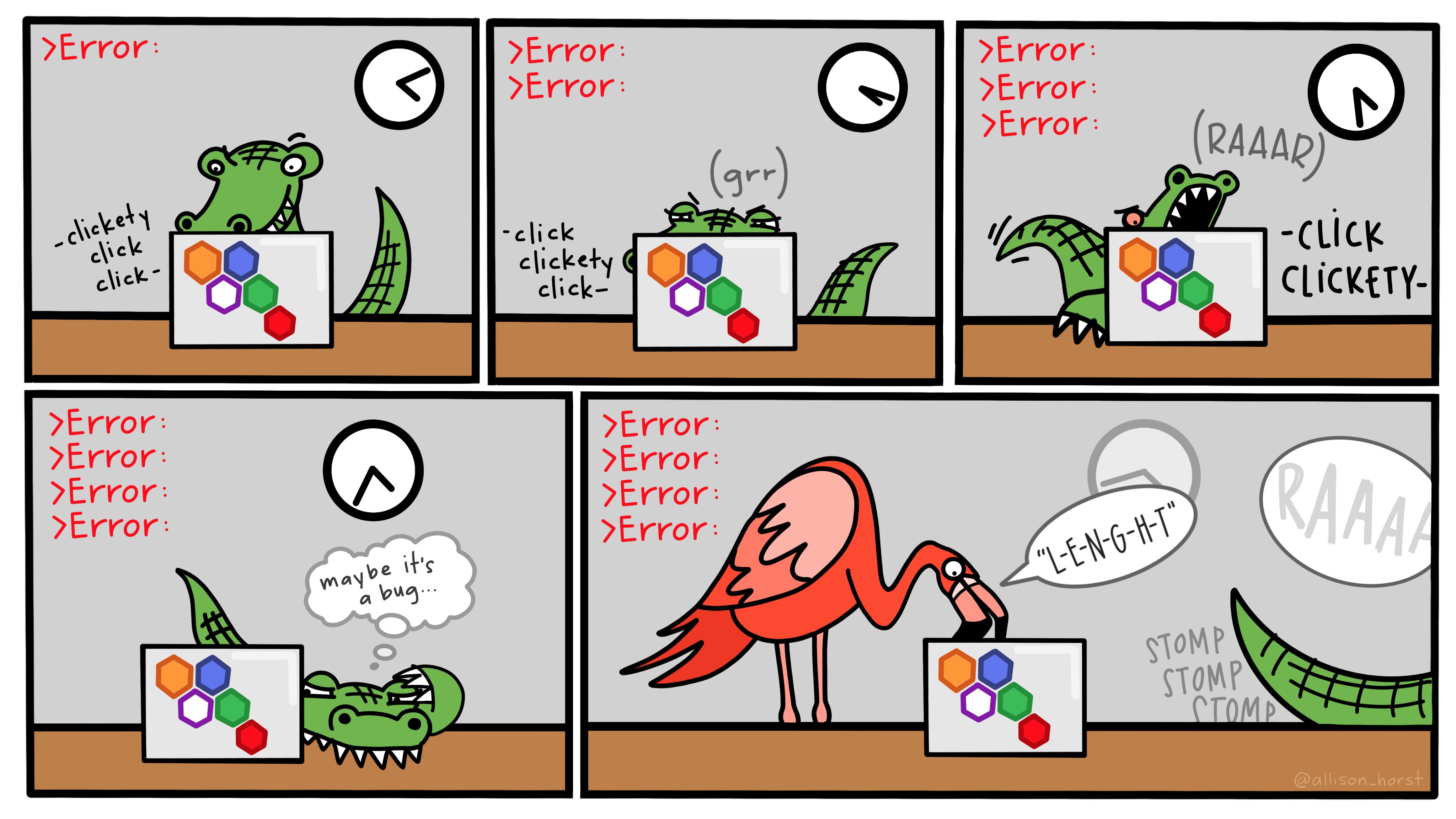
Learning R can be difficult at first—it’s like learning a new language, just like Spanish, French, or Chinese. Hadley Wickham—the chief data scientist at RStudio and the author of some amazing R packages you’ll be using like {ggplot2}—made this wise observation:
It’s easy when you start out programming to get really frustrated and think, “Oh it’s me, I’m really stupid,” or, “I’m not made out to program.” But, that is absolutely not the case. Everyone gets frustrated. I still get frustrated occasionally when writing R code. It’s just a natural part of programming. So, it happens to everyone and gets less and less over time. Don’t blame yourself. Just take a break, do something fun, and then come back and try again later.
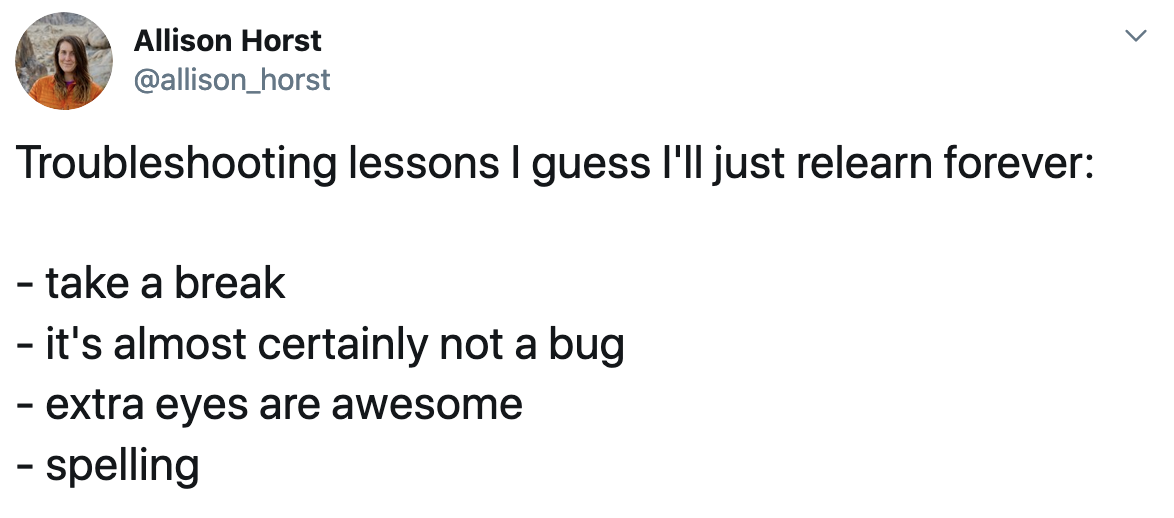
Even experienced programmers find themselves bashing their heads against seemingly intractable errors. If you’re finding yourself taking way too long hitting your head against a wall and not understanding, take a break, talk to classmates, e-mail me, etc.
I’m a big believer in the 30-minute rule:
TipThe 30-minute rule
If you’re stuck on an issue for more than 30 minutes, stop, take a break, and ask for help somewhere.
Course materials
All of the readings and software in this class are free.
Books, articles, and other materials
There are no formal physical textbooks for the class. Instead, we’ll use these two online textbooks:
ModernDive: ModernDive will be our primary textbook. Please take the time to read the assigned chapters in depth and complete the Learning Checks when possible.
OpenIntro Statistics: A few of your readings will also come from the free OpenIntro Statistics book. This is more mathy than ModernDive and you don’t need to read it as carefully—just skim these readings.
There will also occasionally be additional articles and videos to read and watch. These will be linked from the schedule page and PDFs of journal articles will be posted on Canvas.
R and Positron
You will do all of your analysis with the open source (and free!) programming language R. You will use Positron as the main program to access R. Think of R as an engine and Positron as a car dashboard—R handles all the calculations produces the actual statistics and graphical output, while Positron provides a nice interface for running R code.
R is free, but it can sometimes be a pain to install and configure. To make life easier, I will have a server-based version of R and Positron that will let you run a full instance of Positron in your web browser. This means you won’t have to install anything on your computer to get started with R!
The server-based R installation is convenient, but it can be slow and it is not designed to be able to handle larger datasets or more complicated analysis and graphics. Over the course of the semester, you’ll probably want to get around to installing R, Positron, and other R packages on your computer and wean yourself off of the Positron server.
Online help
Data science and statistical programming can be difficult. Computers are stupid and little errors in your code can cause hours of headache (even if you’ve been doing this stuff for years!).
Fortunately there are tons of online resources to help you with this.
Class community on Discord
We have a class Discord server where anyone in the class can ask questions and anyone can answer. The invitation to the server is on Canvas since that’s a password protected place and I want the server to be limited to only students in the class.
I will monitor Discord regularly and will respond quickly. (It’s one of the rare Discord servers where I actually have notifications enabled!) Ask questions about the readings, exercises, and mini projects. You’ll likely have similar questions as your peers, and you’ll likely be able to answer other peoples’ questions too.
Online communities
If you use Bluesky or Mastodon or Threads or LinkedIn, post R-related questions and content with #rstats. The R community is exceptionally generous and helpful.
Searching for help with R on Google can sometimes be tricky because the program name is, um, a single letter. Google is generally smart enough to figure out what you mean when you search for “r scatterplot”, but if it does struggle, try searching for “rstats” instead (e.g. “rstats scatterplot”). Also, since most of your R work will deal with {ggplot2}, it’s often easier to just search for that instead of the letter “r” (e.g. “ggplot scatterplot”).
You can also check out the Posit Community, a forum specifically designed for people using Positron and the tidyverse (i.e. you).
Assignments and grades
You can find descriptions for all the assignments on the assignments page.
Assignments
Grading scale
| Grade | Range | Grade | Range |
|---|---|---|---|
| A | 93–100% | C | 73–76.9% |
| A− | 90–92.9% | C− | 70–72.9% |
| B+ | 87–89.9% | D+ | 67–69.9% |
| B | 83–86.9% | D | 60–66.9% |
| B− | 80–82.9% | F | 59.9% |
| C+ | 77–79.9% |
Course policies
Generative AI and LLMs
In this class, I have two general rules regarding LLMs:
- Everything human-facing must be human-generated.
- You are responsible for understanding, verifying, and citing everything an LLM generates.
I’ll explain what these mean below, but first, an important warning!
LLMs and learning
Phew, I can talk about the relationship between learning and LLMs for hours (see this for a more formal explanation of my thinking). LLMs and generative AI can be useful for statistical programming, but only when you already know what you are doing. They can be dangerous and counterproductive for beginners.
Additionally, using LLMs and generative AI to write does not lead to deeper learning. The point of writing is to help crystalize and organize your thinking. Pasting LLM-generated words into an assignment to make it look like you read and understood the content will not help you learn. Pasting LLM-generated code into an assignment and hoping that it works will not help you learn.
Rule 1: Everything human-facing must be human-generated
Generative AI tools like Gemini, ChatGPT, and Claude can be helpful for generating ideas or topics for your assignments and can even help you find existing research about topics you’re interested in. They are useful for debugging and troubleshooting code.
These uses are permitted in this course.
If you want to use LLM tools to document your code, clean up your notes, look up error messages, search for research related to your topic, and so on, cool. Do it. That’s fine. It’s unavoidable nowadays anyway, since every R-related Google search will give you a Gemini-generated answer at the top with mostly working R code.
Any writing and revisions, however, must be your own. You may not use AI tools to write any of the text you submit to me. AI text adds nothing to my understanding. I have no interest in engaging with it at all. There is nothing more disheartening for me than spending my time grading something that ChatGPT spat out in 10 seconds. I want to see good engagement with the readings. I want to see your thinking process. I want to see you make connections between the readings. I want to see your personal insights. I don’t want to see a bunch of words that look like a human wrote them. That’s not useful for future-you. That’s not useful for me. That’s a waste of time.
Thus, anything human-facing (i.e. not stuff done just for yourself, like your own personal notes, research, etc.) must be human-generated (i.e. written by you). You may not use AI tools to write any portion of your assignments. Using AI tools in this way, or failing to disclose the use of AI tools, will be treated as a case of plagiarism and referred to the Honor Council.
Rule 2: You are responsible for understanding, verifying, and citing everything an LLM generates
These tools are really good at working with code, but again, only if you know what you’re doing. Without guidance and expertise, LLMs love making lots of extraneous, convoluted, and weird code by default. The code ostensibly works, but it’s often strange and unnecessary and uses uncommon syntax and packages.
If you use LLMs for help with code, you must understand and verify what’s going on with your code and you must cite where it came from.
This means that you need to know what each line is doing. If the LLM uses a function or gives you an argument that you don’t understand or haven’t seen before, figure out why and figure out if it’s necessary. Look at the documentation for the function. Search Google for other examples. Ask the LLM about it, and then add comments to the code explaining what’s going on.
The citation doesn’t need to be anything formal (i.e. don’t worry about Chicago or APA guidelines)—it just needs to (1) say which LLM you used, and (2) mention what you asked the LLM.
You should do this by using code comments—inside your code chunk, add a # to the beginning of a line so that it’s treated as a comment (or text) instead of actual code.
Here’s an example of what this can look like:
# This calculates the average GDP per capita in each region in the dataset,
# for all countries after 2015. I couldn't remember how to use group_by() and
# summarise() together, so I asked Gemini:
#
# "I'm using tidyverse. I have a dataset named my_dataset and I'm filtering it
# to include all countries after 2015. I want to calculate region averages with
# group_by and summarise but cannot remember the syntax"

my_dataset |>
  filter(year > 2015) |>
  group_by(region) |>
  # Gemini here included na.rm = TRUE, which omits any rows with missing values
  # when calculating the average. That's okay and necessary here because
  # South Sudan is missing some years of GDP data
  summarise(avg_gdp = mean(gdp_per_cap, na.rm = TRUE))

# Gemini also included an extra ungroup() function at the end, but I don't need
# that because there are no groups leftover after summarising here
↑ That’s a lot of extra comments and you won’t always see stuff like that in real life code, but I want to see it here, and future-you will want to see it too.
Participation
Participation is essential for this class, but it can take different forms. See the “Participation” section on the Assignments page.
Attendance and absences
Your presence in class is crucially important. That said, I understand that life can bring surprises, so your first three absences (for whatever reason) will not affect your grade. After three absences, every additional absence (no matter the reason for the absence) will reduce your overall participation grade by one full letter grade.
Collaboration
Collaboration is crucial to the learning process and our course’s objectives. In-class assignments and larger assignments on Canvas will specify whether the work should be done collaboratively, in pairs, or individually. Please be intentional: if a submission should be done individually, submit only that which is exclusively your work (with appropriate citations, of course). For collaborative assignments, you will be randomly placed in groups unless otherwise specified; please remember to include the full name of each group member on assignments.
Deadlines and late work
Students should make every effort to submit their assignments and materials on time in order to ensure prompt feedback and grading. However, we are all human and things happen. In the event that a deadline is missed or going to be missed, please reach out so we can discuss make-up assignments and set new timelines. If you feel at any point that you are overwhelmed with deadlines or are falling behind, please reach out as soon as possible.
Communication
Like you, I have a full life beyond this course, and so may not always be able to respond to emails immediately. In general, I will try to respond to all course-related Discord messages within 24 hours and e-mails within 48 hours. Please note that emailing me right before a quiz or major assignment may not guarantee feedback or a response in time to impact your work, so please plan your time accordingly.
Technology use
Laptops are essential for many of the activities we’ll do in class. However, studies have shown that laptop and phone use in the classroom is distracting not only for the student using the device, but for their neighbors as well (Hall et al. 2020).
Outside of specific activities that require a laptop, please keep your devices stowed away so that we can all pay attention more fully in class. You should bring your laptop to class, but only take it out when we need to use it for an activity. If you have accommodation needs about technology and laptop use, let me know and we’ll make it work.
Class recording
To protect the privacy of your peers and maintain an environment of open intellectual exchange, students are not permitted to record (audio or video) any part of our class sessions. This includes the use of transcription software or AI assistants. There is an exception for approved accommodations: students with a disability-related recording accommodation approved by the Academic Resource Center are permitted to record solely for their personal study. Unauthorized recording or dissemination of class content is a violation of University Policy and may be referred for disciplinary review.
Instructional continuity
If meeting in person is impossible for a given session (e.g., if the campus is closed), we will meet virtually via Zoom.
Office Student hours
Student hours are set times dedicated to all of you (most professors call these “office hours”; I don’t1). This means that I will be waiting for you to talk to me (in person or remotely) with whatever questions you have. This is the best and easiest way to find me and the best chance for discussing class material and concerns.
The best way to meet with me is to make an appointment with me here. You can choose an online or in-person slot—if you choose an online slot, the confirmation e-mail will contain a link for a Zoom meeting. You can also find me through e-mail and Discord.
University policies and resources
Academic integrity and the honor code
Students at Georgetown University are expected to maintain the highest standards of academic and personal integrity. Academic dishonesty in any form is a serious offense, and students found in violation are subject to academic penalties that include, but are not limited to, failure of the course, termination from the program, and revocation of degrees already conferred. All students are expected to fully adhere to the policies and procedures of Georgetown’s Honor System and to take the Honor Code Pledge:
In pursuit of the high ideals and rigorous standards of academic life I commit myself to respect and to uphold the Georgetown University honor system: to be honest in every academic endeavor, and to conduct myself honorably, as a responsible member of the Georgetown community as we live and work together.
All submissions must be your original work. The Georgetown University Honor System defines plagiarism as “the act of passing off as one’s own the ideas or writings of another.” Any submission suspected of plagiarism will be referred to the Honor Council for investigation and possible adjudication. Note the Honor Council’s Standards of Conduct on AI-generated work: if you didn’t generate the words yourself, say so by quoting and citing the source; if you generated the words but not the content and ideas, say so by citing the source.
Remember the first rule of AI use in this class: everything human-facing must be human-generated. Be honest about that—this is part of the Honor Code.
Accessibility, inclusion, disabilities, and accommodations
One of the central tenets of Georgetown’s educational mission is cura personalis, a Latin phrase meaning “care for the whole person.” I am committed to creating a learning environment that supports a diversity of thoughts, perspectives, and experiences, and honors your identities. If your name or pronoun needs to be corrected, please let me know early in the semester so that I can make the appropriate changes to my records.
Under the Americans with Disabilities Act (ADA) and the Rehabilitation Act of 1973, individuals with disabilities have the right to specific accommodations that do not fundamentally alter the nature of the course. Students are responsible for communicating their needs to the Academic Resource Center (202-687-8354; arc@georgetown.edu), the office that oversees disability support services, before the start of classes to allow time to review the documentation and make recommendations for appropriate accommodations. The University is not responsible for making special accommodations for students who have not declared their disabilities and have not requested an accommodation in a timely manner. For the most current policy information, please refer to the Georgetown University Academic Resource Center website.
Title IX and sexual misconduct
Georgetown University and its faculty are committed to supporting survivors and those impacted by sexual misconduct, which includes sexual assault, sexual harassment, relationship violence, and stalking. Georgetown requires faculty members, unless otherwise designated as confidential, to report all disclosures of sexual misconduct to the University Title IX Coordinator or a Deputy Title IX Coordinator. If you disclose an incident of sexual misconduct to a professor in or outside of the classroom (with the exception of disclosures in papers), that faculty member must report the incident to the Title IX Coordinator or Deputy Title IX Coordinator, who will in turn reach out to the student to provide support, resources, and the option to meet. The student is not required to meet with the Title IX coordinator. If you would prefer to speak to someone confidentially, Georgetown has fully confidential professional resources, including Health Education Services for Sexual Assault Response and Prevention (confidential email: sarp@georgetown.edu) and Counseling and Psychiatric Services (CAPS: 202-687-6985). More information about reporting options and resources can be found on the Sexual Misconduct Resource Center website. Georgetown is also committed to creating an accessible and inclusive environment for pregnant and parenting students; students seeking a pregnancy adjustment or accommodation should follow the process laid out on the Title IX at Georgetown website.
Support services
Resources available to you include:
- Academic Resource Center (202-687-8354, arc@georgetown.edu)
- Counseling and Psychiatric Services (202-687-6985)
- Institutional Diversity, Equity & Affirmative Action (202-687-4798)
- The Georgetown Library and its eResources: ≈1,000 research databases, 1.5+ million ebooks
- The Writing Center: peer tutoring at any stage of the writing process
- The Office of the Student Ombuds (studentombuds@georgetown.edu, 202-784-1081): a confidential, independent, impartial, and informal space to discuss University-related concerns.
All students have 24/7 access to Canvas technical support via the Help icon in Canvas or the support hotline at 855-338-2770.
Recipes
Once you have read this entire syllabus and the assignments page, post your favorite recipe (either a link or the text) to the #recipes channel on Discord. I love cooking (see here for a feed of some of my cooking adventures) and I’m always on the lookout for new things!
References
Hall, Amanda C. G., Tara T. Lineweaver, Eileen E. Hogan, and Sean W. O’Brien. 2020. “On or Off Task: The Negative Influence of Laptops on Neighboring Students’ Learning Depends on How They Are Used.” Computers & Education 153 (August): 103901. https://doi.org/10.1016/j.compedu.2020.103901.
Footnotes
There’s fairly widespread misunderstanding about what office hours actually are! Many students often think that they are the times I shouldn’t be disturbed, which is the exact opposite of what they’re for!↩︎